.

Search cool tricks here !!!

.
.
.
Showing posts with label Rss. Show all posts

Sunday, 5 February 2012

Add A One Time Email Subscription Pop Up Form To Blogger

So many blogs and websites i visit these days have implemented a pop up subscription form for their newsletter.I'm sure you have seen it, you land on a site and after a few seconds a form appears asking for your Email to subscribe.While these can annoy some people they have been proven to have a dramatic effect on the numbers of subscribers.In this post i will show you how to add a similar form to your Blogger blog but with a form to subscribe to your blog via Email Rss provided by feedburner.The form is a one time pop up so if someone visits your blog every day it will remember they visited before and not show the form again.

This tutorial was originally posted on the excellent Simplex Design blog so make sure to check them out


Add The Pop Up Subscription Box To Blogger


Remember Always Back Up Your Template Before You Make Changes - How To Back Up A Blogger Template 

Step 1. In Your Blogger Dashboard Click Design > Edit Html 
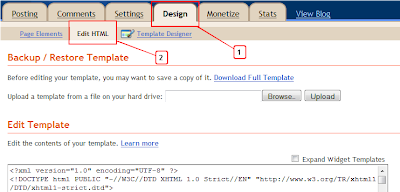
Design Edit Html Blogger

Step 2. Find the following piece of code in your blogs Html : (Click Ctrl and F for a search bar to help find the code - How To Find Code In Blogger Template Template

]]></b:skin>

Step 3. Copy and Paste the following code Directly Above / Before ]]></b:skin>

Note - This is a scroll box make sure to get all the code.
/*Subscription Pop Up Css*/
#popupContactClose{
cursor: pointer;
text-decoration:none;
}
#backgroundPopup{
display:none;
position:fixed;
_position:absolute; /* hack for internet explorer 6*/
height:100%;
width:100%;
top:0;
left:0;
background:#000000;
border:1px solid #cecece;
z-index:1;
}
#popupContact{
display:none;
position:fixed;
_position:absolute; /* hack for internet explorer 6*/
height:384px;
width:408px;
background:#FFFFFF;
border:2px solid #cecece;
z-index:2;
padding:12px;
font-size:13px;
}
#popupContact h1{
text-align:left;
color:#6FA5FD;
font-size:22px;
font-weight:700;
border-bottom:1px dotted #D3D3D3;
padding-bottom:2px;
margin-bottom:20px;
}
#popupContactClose{
font-size:14px;
line-height:14px;
right:6px;
top:4px;
position:absolute;
color:#6fa5fd;
font-weight:700;
display:block;
}
/*End Subscription Pop Up Css @ http://www.spiceupyourblog.com */

Step 4. Find the following piece of code in your blogs Html : (Click Ctrl and F for a search bar to help find the code - How To Find Code In Blogger Template Template

</head>

Step 5. Now Copy And Paste This Code Directly Above / Before </head>

<!--Pop Up Subscription-->
<script src='https://ajax.googleapis.com/ajax/libs/jquery/1.5.0/jquery.min.js' type='text/javascript'/> 
<script src='http://dinhquanghuy.110mb.com/jquery.cookie.js' type='text/javascript'/>
<script type='text/javascript'>
var popupStatus = 0;

//loading popup with jQuery magic!
function loadPopup(){
centerPopup();
//loads popup only if it is disabled
if(popupStatus==0){
$(&quot;#backgroundPopup&quot;).css({
&quot;opacity&quot;: &quot;0.7&quot;
});
$(&quot;#backgroundPopup&quot;).fadeIn(&quot;slow&quot;);
$(&quot;#popupContact&quot;).fadeIn(&quot;slow&quot;);
popupStatus = 1;
}
}

//disabling popup with jQuery magic!
function disablePopup(){
//disables popup only if it is enabled
if(popupStatus==1){
$(&quot;#backgroundPopup&quot;).fadeOut(&quot;slow&quot;);
$(&quot;#popupContact&quot;).fadeOut(&quot;slow&quot;);
popupStatus = 0;
}
}

//centering popup
function centerPopup(){
//request data for centering
var windowWidth = document.documentElement.clientWidth; 
var windowHeight = document.documentElement.clientHeight; 
var windowscrolltop = document.documentElement.scrollTop;
var windowscrollleft = document.documentElement.scrollLeft;
var popupHeight = $(&quot;#popupContact&quot;).height();
var popupWidth = $(&quot;#popupContact&quot;).width();
var toppos = windowHeight/2-popupHeight/2+windowscrolltop;
var leftpos = windowWidth/2-popupWidth/2+windowscrollleft;
//centering
$(&quot;#popupContact&quot;).css({
&quot;position&quot;: &quot;absolute&quot;,
&quot;top&quot;: toppos,
&quot;left&quot;: leftpos
});
//only need force for IE6

$(&quot;#backgroundPopup&quot;).css({
&quot;height&quot;: windowHeight
});

}


//CONTROLLING EVENTS IN jQuery
$(document).ready(function(){
if ($.cookie(&quot;anewsletter&quot;) != 1) { 

//load popup
setTimeout(&quot;loadPopup()&quot;,5000); 

//CLOSING POPUP
//Click the x event!
$(&quot;#popupContactClose&quot;).click(function(){
disablePopup();
$.cookie(&quot;anewsletter&quot;, &quot;1&quot;, { expires: 7 });
});
//Click out event!
$(&quot;#backgroundPopup&quot;).click(function(){
disablePopup();
$.cookie(&quot;anewsletter&quot;, &quot;1&quot;, { expires: 7 });
});
//Press Escape event!
$(document).keypress(function(e){
if(e.keyCode==27 &amp;&amp; popupStatus==1){
disablePopup();
$.cookie(&quot;anewsletter&quot;, &quot;1&quot;, { expires: 7 });
}
});

});
</script>
<!--End Pop Up Subscription @ http://www.spiceupyourblog.com -->

Step 6. Find the following piece of code in your blogs Html : (Click Ctrl and F for a search bar to help find the code - How To Find Code In Blogger Template Template)

</body>

Step 7. Copy and Paste the following code Directly Above / Before </body>

<div id='popupContact'>
<a id='popupContactClose'>x</a>
<h1>Get Our Latest Posts Via Email - It&#39;s Free</h1>
<p id='contactArea'><form action='http://feedburner.google.com/fb/a/mailverify' method='post' onsubmit='window.open(&apos;http://feedburner.google.com/fb/a/mailverify?uri=username&apos;, &apos;popupwindow&apos;, &apos;scrollbars=yes,width=550,height=520&apos;);return true' style='border:1px solid #ccc;padding:3px;text-align:center;' target='popupwindow'><p>Enter your email address:</p><p><input name='email' style='width:140px' type='text'/></p><input name='uri' type='hidden' value='username'/><input name='loc' type='hidden' value='en_US'/><input type='submit' value='Subscribe'/><p>Delivered by <a href='http://feedburner.google.com' target='_blank'>FeedBurner</a></p></form></p>
</div>
<div id='backgroundPopup'/>

Important - You need to change our feedburner username with yours.The username for your feed can be found at the end of your feed URL.For example the our feedburner URL is http://feeds.feedburner.com/default , 

That's it all thanks go to Simplex Design.

Make Your Blog Sticky With Images, Aesthetics And Content

The stickiness of your blog is one of the most important measures of its success. You may be able to drive a large number of visitors to your blog, but unless the visitors stick around and engage with your blog closely, and return repeatedly, you may not find sustainable success in the highly volatile and mercurial world of blogging. 

Creative Use of Images


Many bloggers commit the cardinal mistake of over-emphasizing on the quality of written content while ignoring the importance of images in the process. Images help to arouse the curiosity of a new visitor, and get him or her drawn into your blog’s great content. An average blog visitor’s attention span is very limited because the choices for readers are too many out there in the free world of blogging. 

Therefore, unless you make a creative use of images you may end up with a blog that appears drab, unexciting, and visually unappealing. Many visitors to such a blog may make a quick exit without waiting to check the quality of its content, if the design and appearance of the blog does not appear inviting, refreshing, and somewhat rewarding. 

Images are easily obtained through sites like iStockPhoto, Jupiter Images or Shutterpoint. Tools like Zemanta can also help bloggers find images that fall under GPL and Creative Commons licensing. 

Encourage RSS Subscriptions


In a highly competitive world of blogging, it has become very important to include an RSS feed and invite the readers to subscribe to the blog. This will help to create a loyal blog readership because the blog posts will drop directly into the subscriber’s mailbox. RSS feed is one of the biggest reasons of the success of prominent blogs around the world. 

Tools like RSS 2.0 and Atom 1.0 are built right in to WordPress and Blogger so you can get a feed set up rather easily for your readers. 

Smart Blog Design


Bloggers who are keen to enhance the stickiness of their blog for the long haul cannot afford to ignore blog design. New visitors tend to judge a blog within the first few seconds of their visit. If they find the blog confusing, cluttered, or difficult to navigate, a majority of them will not wait to stick around to read too much of the content even of the content that was read was marvellously written. If the placement of ads takes precedence over the placement of content, it can put off many visitors and kill the stickiness of a potentially impressive blog (see Myspace). 

Clear Blog Branding


Your maximum effort should be invested in creating a great homepage that draws visitors into the blog. A new visitor should be able to know exactly what the blog is all about almost at the first glance itself. Blog design, title, headlines, taglines, logo, and navigational elements should all work to communicate effectively about the blog’s content. 

Compelling Content


The backbone of any sticky blog, ultimately, is the quality of its content. A blog that makes outstanding promises at the outset and delivers little in terms of content is likely to fizzle out soon. The content must be relevant and sharply focused to the tastes and preferences of the target audience. 

Furthermore, it is critical that the content must be updated regularly. Each time the blog should have something new and exciting to offer to the readers. In a fast-paced world of blogging, the blogger cannot afford to take it easy or become complacent about dishing out and providing new content consistently.

While any one of these techniques can help keep your readers engaged longer on your site, a combination of them will help keep your readers focused on what your site has to say to them and will develop a much stronger community around your blog. 


Author writes a coupon site that offers the latest Jupiter Images coupons andiStockPhoto promotional codes to help people save money on stock images.

How To Add Beautiful Subscribe Section to Blogger


Do you like to add a good looking Subscribe section to your blog?Then simply follow the steps below.

1.Login to your blogger dashboard--> layout- -> Edit HTML

2.Scroll down to where you see </head> tag .

3.Copy below code and paste it just before the </head> tag .


<style type='text/css'>

#hsection{border:4px solid #D3D3D3;background-color:#e9e9e9;}
#hsection:hover{border:4px solid #BABABA;background-color:#e9e9e9;}

#sectionmy .sectionmy2 h2.subscription { border:0; margin:0; padding:6px 0 0 55px; height:42px; font-size:16px;font-family:"Segoe UI",Calibri,"Myriad Pro",Myriad,"Trebuchet MS",Helvetica,Arial,sans-serif;
font-weight:bold; }

#sectionmy .sectionmy2 h2.rss { background:url(https://blogger.googleusercontent.com/img/b/R29vZ2xl/AVvXsEjiabJX9WkoUqY6hFs23hEuAraFGqoZWUs7HyJEN6bQ9c1Ek8MX2MF4yereRSpIuh1gzoKiC33H50q1d8oW91L_5FzntxW1ZOYzXAuEEOyHjdXjqb_wms_OWqsd2ZGVZIsIeS-lxBMzgPAw/) no-repeat top left; }

#sectionmy .sectionmy2 h2.email { background:url(https://blogger.googleusercontent.com/img/b/R29vZ2xl/AVvXsEiaFzLC1jAE59dRBfV9OYPj9iAznVKlaryF1aIuqR3fB3UyyOxJQBWvC1GwAsqSDcOfLuNbR240HsVj5W2okYQFXGpgGwTZ-WMuarH4a94z801kM-D0suz9SAVyyzmEpON3ATdu8NkckPnR/) no-repeat top left; }

#sectionmy .sectionmy2 h2.twitter { background:url(https://blogger.googleusercontent.com/img/b/R29vZ2xl/AVvXsEhTRF0PKBb-769-mkOzF0GIulQRKU4ztxlNpsieedFv1ImHP14_HUHAYP4-x-UQ7PKO5i2x0L9EO_nGnFQmO-TxRvj5Dgs3QdjcJVJxZlDDfLvFDexdkGSipdgoV4UONDMD-G_F8CvAOkFP/) no-repeat top left; }

#sectionmy .sectionmy2 .subscription a { color:#252e28; text-decoration:none; }

</style>


NOTE : Host RSS.png , EmailRSS.png , twitter.png yourself.


4.Now go to Layout-->Page Element and click on "Add a gadget".

5.Select "html/java script" and add the code given below and click save.

<div id="hsection">
<div id="sectionmy">
<div class="sectionmy2">

<h2 class="subscription rss"><a href="YOUR-RSS-FEED-URL">SUBSCRIBE VIA RSS</a></h2>

<h2 class="subscription email"><a href="YOUR-FEEDBURNER-EMAIL-SUBSCRIPTION-URL">SUBSCRIBE VIA EMAIL</a></h2>

<h2 class="subscription twitter"><a href="YOUR-TWITTER-URL">FOLLOW ON TWITTER</a></h2>

</div></div>
</div>


NOTE : Replace YOUR-RSS-FEED-URL , YOUR-FEEDBURNER-EMAIL-SUBSCRIPTION-URL , YOUR-TWITTER-URL with your urls.

You are done.

 
Blogger Widgets